A keyless deadbolt makes daily entry feel less fussy, especially for busy homes, rentals, and side doors that get used all day. You get keypad access, fingerprint entry, app control, or a simple turn-piece setup, depending on how much convenience you want. The right match also depends on your door, your routine, and how much tinkering you want to do during setup.
Quick Look At The Shortlist

Philips Wi-Fi Door Lock, WiFi Smart Lock

Philips Wi-Fi Door Lock, WiFi Smart Lock

Schlage Electronic Keypad Deadbolt Lock, Camelot Trim
Kwikset 663 Deadbolt Unkeyed Deadbolt Lock
Philips Fingerprint Keyless Entry Door Lock
Philips Fingerprint Electronic Door Lock

eufy Security Smart Lock C33, Keypad Door Lock

eufy Security Smart Lock C33, Keypad Door Lock
More Details On Our Top Picks
You get a very flexible front-door setup here, with Wi-Fi built in and several unlock paths that suit a hectic household. The fingerprint and passcode options help when your hands are full, and voice-assistant compatibility makes it feel modern without turning the door into a science project.
Compared with the Schlage keypad lock later in this list, this Philips option leans harder into connected access and remote use. The trade-off is that more features usually mean more setup attention, so it fits best for you when convenience matters more than staying minimal.
Strong Points
- Built-in Wi-Fi supports remote entry control from the product app.
- Fingerprint access can spare you from key fumble at the door.
- Passcode entry gives household members a simple backup method.
- Auto-locking helps reduce the “did you shut it?” moment on busy days.
- Alexa and Google Assistant compatibility suits connected homes.
Things To Consider
- All those connected features bring extra setup steps, especially for first-time smart-lock owners.
- App-dependent access can feel more complex than a basic keypad deadbolt.
- For very simple entry needs, this may be more system than you want.
Feature Snapshot
Who It Suits Best
You should look here first for a connected household that wants remote control, fingerprint entry, and voice-assistant support in one lock.
A Better Fit Elsewhere
Schlage Electronic Keypad Deadbolt Lock, Camelot Trim fits you better when you want a simpler keypad-first setup without app-heavy features.
This Philips version trims the headline feature set a bit, which can be a good thing for you after the first model’s broader smart-home emphasis. Built-in Wi-Fi still keeps control close at hand, and the remote-control angle makes sense for busy doors that get checked from across town.
In a rental, an office entry, or a home where you want fewer moving parts, that leaner shape can feel easier to live with. You may find it a cleaner match than the fingerprint-heavy models lower in the list when your main goal is simple connected access.
What We Like
- Built-in Wi-Fi keeps the lock connected without extra hardware.
- Remote control suits doors you monitor away from home.
- The simpler feature mix can feel less cluttered than more layered smart locks.
Points To Note
- You give up some of the multi-method convenience seen on the fingerprint models.
- Anyone wanting the most physical unlock options may prefer the first Philips lock.
- Smart features still deserve a careful setup pass so access stays organized.
Core Details
Who Should Grab It
You fit this model best when you want Wi-Fi control first and a straightforward smart-lock setup second.
Another Choice May Suit
eufy Security Smart Lock C33, Keypad Door Lock with Handle suits you better when you want a handle-based entry point along with fingerprint access.
Schlage keeps things refreshingly direct here, with a push-button keypad and a matte black Camelot trim that looks at home on many front doors. The keypad-first approach is useful for you if you want quick entry without app juggling or fingerprint enrollment.
Compared with the Philips smart locks above, this one feels more grounded and less gadget-heavy. There’s a trade-off, of course, because you lose remote control and biometric access, but many homes don’t need those extras every day.
Best Bits
- Push-button entry keeps daily use fast and familiar.
- Key backup adds a practical fallback for uncertain moments.
- The Camelot trim gives the door a more traditional profile.
- Easy-install positioning suits many standard front doors.
Room For Improvement
- No app control means you give up remote access.
- Fingerprint fans may want the Philips or eufy models instead.
- Keypad surfaces need regular cleaning to stay easy to read and press.
Details At A Glance
Best Suited To
You’ll appreciate this most on a standard front entry where a dependable keypad is enough.
Skip It When
Philips Wi-Fi Door Lock, WiFi Smart Lock Keyless Entry Deadbolt makes more sense for you when app control and remote access are part of the plan.
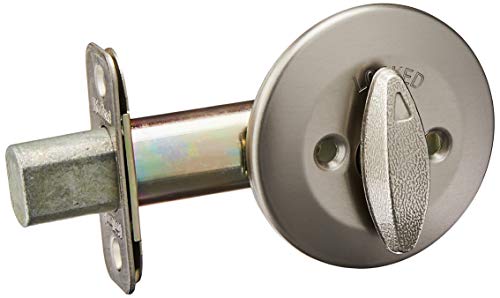
Kwikset takes a very stripped-back approach here, with an interior round turn piece and no exterior assembly in the source details. That makes the lock feel more like a straightforward hardware solution than a connected gadget, which can suit you in a simpler entry setup.
Compared with the Schlage keypad lock, this one gives you less electronic convenience but also fewer things to manage. The honest read is that it makes sense for specific door configurations, especially where you care more about basic interior control than modern access methods.
Highlights
- Unkeyed design keeps the hardware concept simple.
- Interior turn piece is easy to understand at a glance.
- Satin nickel finish works with many common fixtures.
- Latch and adapter included for a more complete hardware package.
Small Caveats
- This is not the right fit for anyone seeking keypad or fingerprint entry.
- No exterior assembly means it serves a narrower set of door needs.
- Hardware like this benefits from careful matching to your door prep.
Core Details
Made For
You suit this lock best when your door setup calls for a basic unkeyed interior deadbolt rather than app-led entry.
Look Elsewhere When
Schlage Electronic Keypad Deadbolt Lock, Camelot Trim is the better match for you when you still want a simple code-based entrance.
This Philips model brings together fingerprint access, a touchscreen, auto locking, and one-time code use, which makes it feel well suited to everyday family traffic. The long-lasting battery note matters too, since battery life becomes part of the convenience story on any smart lock you use every day.
It sits neatly between the more connected Philips Wi-Fi lock and the more basic Schlage keypad. You may find it the sweet spot when you want modern entry options without moving all the way into app-heavy control.
Positives
- Fingerprint entry helps speed up coming and going.
- Touchscreen access gives you a clean, modern face on the door.
- One-time code support works well for guests or short visits.
- Auto locking reduces the chance of leaving the door unsecured by habit.
- Long-lasting battery language is reassuring for daily use routines.
Areas To Watch
- Touchscreens can show fingerprints, so occasional wiping keeps them tidy.
- App-free buyers may still prefer the even simpler Schlage keypad.
- Battery care matters, because any electronic lock depends on regular checks.
Technical Sheet
Right Fit For
You suit this lock best when you want fingerprint convenience, touchscreen entry, and a simple, modern deadbolt for family life.
Where A Sibling Pick Shines
Philips Wi-Fi Door Lock, WiFi Smart Lock Keyless Entry Deadbolt fits better for you when remote control and voice-assistant support matter more than a local-first setup.
Compared with the B0CLS4WRHH Philips lock, this version leans into a very similar daily-use formula, just with a satin nickel finish that may suit lighter hardware better. The mix of fingerprint access, touchscreen control, one-time codes, and one-touch locking makes it practical for a house where several people come and go at different times.
Battery-conscious shoppers will likely appreciate the long-lasting battery wording, though regular checks still make sense with any electronic deadbolt. The overall feel is steady rather than flashy, and that’s exactly what some front doors need.
Upsides
- Fingerprint entry is convenient for everyday comings and goings.
- One-touch locking keeps exit routines quick.
- One-time code support works well for temporary access.
- Touchscreen control keeps the layout familiar.
- Satin nickel finishes nicely with lighter door hardware.
Honest Caveats
- Touch surfaces can benefit from routine cleaning.
- It overlaps heavily with the matte black Philips model, so finish may decide it.
- Any battery-powered lock rewards a simple replacement routine.
Feature Rundown
The Right Fit
You suit this lock best when you want a straightforward fingerprint deadbolt that still looks balanced on a satin nickel door.
Swap It Out When
eufy Security Smart Lock C33, Keypad Door Lock with Handle suits you better when a handle-plus-lock setup feels easier for the door you use most.
This eufy C33 bundles a lot into one setup, with a keypad, handle, fingerprint knob, Wi-Fi, app control, and an IP53 rating for basic outdoor exposure. IP53 means protection against limited dust ingress and light water spray, so it feels more at home on an exterior door than a purely indoor lock.
For a front door, or even a bedroom door where the handle format matters, the whole package can feel easy to live with. The trade-off is that more pieces and more access paths usually mean more decisions during setup, so it suits you best when you want flexibility over simplicity.
Bright Spots
- Handle plus lock design can feel more natural on some doors.
- Fingerprint access keeps entry fast for frequent use.
- Wi-Fi and app control expand how you manage access.
- IP53 protection suits exposed doors better than indoor-only hardware.
- The mix of entry methods gives guests and family members options.
Trade Offs
- The feature count may feel like more setup than a basic keypad lock.
- Handle-based hardware takes more visual and physical space on the door.
- People who want a very minimal deadbolt may prefer the Schlage model.
Spec Overview
Built With In Mind
You fit this lock best when you want a connected entry system with a handle, fingerprint access, and front-door practicality.
Another Choice May Suit
Philips Fingerprint Electronic Door Lock, Keyless Entry Door Lock is the better match for you when you want a more compact deadbolt-style setup instead of a handle.
This version of the C33 keeps the same handle-and-keypad idea, but built-in Wi-Fi pushes it further into remote access territory. Compared with the B0DKF97S22 model, that makes it a better fit for you when app control matters as much as local entry.
The nickel finish also gives it a slightly different visual feel from the black model earlier, so style can help make the call. In most homes, the real question is whether you want a lock that stays local and simple or one that plugs more fully into daily phone use.
Reasons To Buy
- Built-in Wi-Fi reduces dependence on extra bridge hardware.
- App control adds remote access convenience.
- The handle format is friendly in high-traffic doorways.
- Fingerprint and keypad access cover both quick and planned entry.
- Nickel finish suits brighter or more traditional trim.
Worth Noting
- Wi-Fi control adds setup steps that basic locks skip.
- The handle style takes more room than a plain deadbolt.
- People who want the simplest path may prefer the non-Wi-Fi C33.
Feature Card
Whose Shelf It Belongs On
You fit this model best when you want the C33 layout with built-in Wi-Fi and a more connected daily routine.
Where Shoppers Go Wrong
eufy Security Smart Lock C33, Keypad Door Lock with Handle, Fingerprint Door Knob, Keyless Entry Door Lock for Front Door and Bedrooms suits you better when the black, non-Wi-Fi version feels like enough.
How To Choose The Right Keyless Deadbolts
Match The Entry Method To Daily Habits
Keypad locks suit families, guests, and anyone who wants a code on hand without carrying keys. Fingerprint locks save a step at the door, which feels especially handy during school runs, grocery trips, or late returns with full hands. App control helps most when you manage access from away from home, while simpler turn-piece hardware fits doors that just need direct interior control.
Check The Door Before You Shop
Door style matters as much as the lock itself. Handle-and-deadbolt combinations need more space, while standard deadbolts are easier to place on a typical front entry. Finish also matters in a quiet way, since matte black, satin nickel, and nickel each blend differently with existing trim, hinges, and handles.
Think About Setup And Daily Maintenance
Smart locks ask for a little upkeep, especially around batteries, touch surfaces, and app settings. A touchscreen benefits from occasional wiping, and a fingerprint sensor works best when the surface stays clean. More features bring more convenience, but they also bring more steps during setup and more attention later.
Choose For Access Needs, Not Spec Sheets
The best match is usually the one that fits your entry pattern. Remote access helps for rental turns or package-day changes, while one-time codes help with short visits and service calls. A basic keypad or interior turn piece can feel calmer and easier to live with than a fuller smart-home setup, especially on a door you use constantly.
Things Worth Knowing First
Mistakes Worth Dodging
Many shoppers get pulled toward features they won’t use. A fingerprint reader looks useful, but a keypad may be enough for your home, and a Wi-Fi lock can be more than you need on a simple side door. Door compatibility also gets overlooked, so measure carefully before you settle on a style.
Another common slip is forgetting about upkeep. Electronic locks need battery checks, and smooth surfaces need occasional cleaning so codes and touch controls stay easy to use. Small habits matter more than flashy feature lists.
What The Higher Tier Buys
More expensive locks usually pay for added access modes, better app control, and a richer hardware layout. You’re often paying for convenience rather than raw locking power, which makes sense for busy homes, rentals, and doors that see heavy daily use. The value grows when multiple people need different ways in.
That extra spend can also make sense for doors that sit outdoors or get a lot of traffic, since better-finished hardware and stronger feature sets tend to feel easier to live with. For a spare entry or a low-traffic door, a simpler model often covers the need without extra fuss.
Final Thoughts
You’ve got a strong spread here, from simple keypad deadbolts to connected Wi-Fi locks and handle-based options. The right choice comes down to how you enter the house, how much setup you want to manage, and whether your door needs a plain deadbolt or a more complete hardware package. For most homes, the best pick is the one that makes daily entry feel smoother without adding chores.