

Electronic deadbolts make daily entry easier when you’re juggling groceries, school bags, guests, or rental turnover. You get keypad access, fingerprint unlock, app control, and auto-lock options without carrying a traditional key around all day. The right fit depends on your door, your routine, and how much control you want from inside or away from home. This roundup keeps the focus on practical use, not fluff.
Quick Look at the Shortlist

Philips Wi-Fi Door Lock, WiFi Smart Lock Keyless Entry Deadbolt

Philips Wi-Fi Door Lock, WiFi Smart Lock Keyless Entry Deadbolt
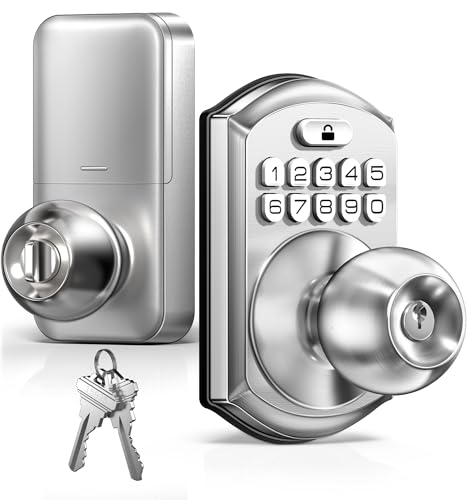
TEEHO TE003 Keyless Entry Keypad Door Lock with Handle, Satin Nickel

Schlage Electronic Keypad Deadbolt Lock, Camelot Trim, Matte Black, BE365
Philips Fingerprint Keyless Entry Door Lock, Touchscreen, Matte Black
Philips Fingerprint Electronic Door Lock, Touchscreen, Satin Nickel

Sifely Fingerprint Smart Deadbolt with Keypad, App & Code Access

Sifely Fingerprint Smart Deadbolt with Keypad, App & Code Access
More Details On Our Top Picks
Remote control and fingerprint access make this Philips lock feel built for a busy front door, especially when your hands are full and you do not want to dig for keys. Built-in Wi-Fi means you can manage access without a separate hub, and auto-lock adds a useful layer of routine comfort for families and frequent guests.
The trade-off with a connected lock is that setup matters more than on a plain keypad model like the Schlage BE365. For most homes, though, the mix of app control, passcode entry, and assistant compatibility will suit the person who wants one lock to do a lot of jobs.
Strong Points
- Built-in Wi-Fi reduces the need for extra bridge hardware.
- Fingerprint and passcode options give you flexible entry choices.
- Auto-lock helps cut down on forgotten-door moments.
- App control works well for guests, family, or rental access.
Things To Consider
- Connected features can take more setup time than a basic keypad lock.
- Wi-Fi dependence means your home network matters to daily convenience.
- The finish and touch surfaces may need regular wiping in high-traffic homes.
Feature Snapshot
Who It Suits Best
Busy households that want remote control, fingerprint entry, and voice-assistant compatibility will get the most from this one.
Where A Sibling Pick Shines
Schlage Electronic Keypad Deadbolt Lock, Camelot Trim, Matte Black, BE365 suits you better if you want a simpler front-door lock with fewer connected features to manage.
This Philips version keeps the same connected-first feel, but the listing leans more toward remote access than on-door showiness. For a home where you let in relatives, cleaners, or house sitters, that sort of control can save a few awkward back-and-forth messages.
The practical appeal comes from the built-in Wi-Fi and passcode-plus-fingerprint style access, which trims down the number of spare keys floating around. Compared with the first Philips lock, this one reads a touch more straightforward in how it presents remote control, so it suits shoppers who want that feature front and center.
What We Like
- Remote control is a strong fit for homes with changing access needs.
- Built-in Wi-Fi keeps the setup cleaner than hub-based systems.
- Fingerprint and code entry support everyday convenience.
- Auto-locking helps with routine door management.
Points To Note
- App-driven features may feel like more than you need for a spare entry.
- Shared homes will benefit most, while a single-user door may not use everything.
- Touch surfaces can show smudges in bright entryways.
Core Details
Who Should Grab It
Shared households and hosts who want remote access control without a separate hub will find this version easy to work with.
A Better Fit Elsewhere
TEEHO TE003 Keyless Entry Keypad Door Lock with Handle, Satin Nickel suits you better if you want a simpler, non-connected setup for a bedroom or side door.
Keypad-and-handle designs like this one make sense for rooms that need fast, no-fuss entry, such as bedrooms, side doors, or a back entrance that gets used often. Satin nickel also keeps the look clean and familiar, which helps it blend in more easily than a bulkier smart lock face.
The passage mode is the useful part here, because it gives you a way to keep the door from relocking during steady in-and-out movement. That’s handy in a home office or a room where people are moving through all day, though the trade-off is that it does not bring the connected extras of Philips or Sifely.
Upsides
- Handle and keypad together make daily use feel familiar.
- Passage mode suits rooms with frequent traffic.
- Auto-lock adds a bit of extra routine convenience.
- Satin nickel gives the lock a straightforward, tidy look.
Areas To Watch
- It leans more basic than app-connected deadbolts.
- Best results come on doors that match the intended handle layout.
- High-touch areas may need occasional cleaning to keep the finish looking even.
Feature Card
Best Suited To
Homeowners who want a simple keypad lock with a handle for bedrooms, offices, or side doors will get the cleanest fit here.
Another Choice May Suit
Philips Wi-Fi Door Lock, WiFi Smart Lock Keyless Entry Deadbolt suits you better if remote control and fingerprint access matter more than a handle-based design.
Schlage’s Camelot trim gives this deadbolt a more traditional face, which suits you if the front door already leans classic instead of ultra-modern. The matte black finish also keeps it visually quiet, and the push-button keypad is straightforward enough for guests who only need a simple entry code.
The included backup key is the practical safety net here, and that matters in homes where you want a non-app route sitting ready. Compared with the Philips locks, this one gives up remote features, but that trade-off is exactly why some households prefer it.
Bright Spots
- Push-button keypad keeps daily entry simple.
- Backup key adds a familiar fallback.
- Camelot trim gives the lock a classic profile.
- Matte black finish pairs well with darker door hardware.
Softer Spots
- It does not offer app control or Wi-Fi features.
- The button layout may feel less modern than touchscreens.
- Frequent use can leave fingerprints on darker finishes, so light cleaning helps.
Details At A Glance
Whose Shelf It Belongs On
Shoppers who want a keypad deadbolt with a classic look and a backup key will find this one especially comfortable to live with.
Skip It When
Philips Wi-Fi Door Lock, WiFi Smart Lock Keyless Entry Deadbolt suits you better if remote access and app control are part of your daily routine.
This Philips lock leans into everyday convenience with a touchscreen, fingerprint access, and one-touch locking, so it feels made for a front door that sees constant use. The one-time code option is especially handy for guests or service visits, since you can keep the main code flow cleaner.
Auto-lock helps reduce the little forgetful moments that happen during a rushed morning, and the long-lasting battery claim matters because nobody wants constant maintenance on a door lock. Compared with the Schlage BE365, you get more access modes here, but also a more tech-forward feel.
Standout Traits
- Touchscreen entry keeps the front face clean and simple to use.
- Fingerprint unlock suits daily traffic very well.
- One-time code support helps with guest access.
- One-touch locking makes exits feel quicker.
- Auto-lock adds a useful backstop for busy mornings.
Minor Gripes
- Touch surfaces usually show smudges more than button-style keypads.
- More features mean more setup decisions at the start.
- Dark finishes can ask for a little more wiping in bright entry areas.
Feature Rundown
Who Will Love This
Family homes that need fingerprint entry, guest codes, and quick locking will get a lot of mileage from this layout.
Look Elsewhere When
Schlage Electronic Keypad Deadbolt Lock, Camelot Trim, Matte Black, BE365 fits you better if you want a simpler deadbolt with backup key access and fewer touch surfaces.
This satin nickel Philips model looks like the calmer sibling to the matte black version, and that matters more than it sounds for front doors that already have brushed hardware. The touchscreen, fingerprint access, and one-time code setup give you the right spread of entry options without making the lock feel crowded.
Auto-lock and one-touch locking are the parts you’ll notice most in daily life, especially during school runs or late-night returns. The honest read is that it suits households wanting a well-rounded smart lock feel without stepping into remote-control territory.
Reasons To Buy
- Fingerprint entry keeps daily access fast.
- Touchscreen controls feel clean and familiar.
- One-time codes help with visitors and short-term access.
- Auto-lock adds peace of mind during rushed departures.
Small Caveats
- The touchscreen can pick up fingerprints and needs the occasional wipe.
- It still asks for a bit more setup than a simple keypad deadbolt.
- Satin nickel looks versatile, but it may not suit very dark exterior hardware.
Quick Facts
The Right Fit
You’ll like this most if you want a straightforward smart deadbolt feel for a busy family door without extra app-heavy features.
Swap It Out When
Sifely Fingerprint Smart Deadbolt with Keypad, App & Code Access suits you better if rental-style access control and app management matter more than a clean, simple home setup.
That longer use-case list on the product page tells you almost everything: this lock is aimed at homes, apartments, offices, rentals, and shared spaces. App access, code access, fingerprint entry, and auto-lock all work together in a way that makes sense for places with changing users.
For Airbnb hosts or offices that need simpler handoffs, this kind of deadbolt removes a lot of key tracking headaches. Compared with Philips’ Wi-Fi models, Sifely feels more centered on access management than on polished home automation.
Best Bits
- App and code access make user management easier.
- Fingerprint entry suits people who come and go often.
- Auto-lock is useful in rentals and shared spaces.
- Works across home, office, and short-term rental settings.
Honest Caveats
- Feature depth can be more than a casual single-family door needs.
- App-managed access takes a little setup time up front.
- High-turnover doors may need occasional label or code housekeeping.
Core Details
Built With In Mind
Hosts, small offices, and families that need flexible user access will get the most value from this Sifely deadbolt.
Consider Something Else When
TEEHO TE003 Keyless Entry Keypad Door Lock with Handle, Satin Nickel suits you better if you want a simpler lock for a bedroom or side door instead of app-based access control.
This Sifely listing overlaps heavily with the earlier model, so the real question becomes space and role, not brand curiosity. In a smaller entry area, the compact deadbolt style makes sense because you can keep the door controlled without adding a large handle assembly.
The same mix of app, code, and fingerprint access works well for apartments, rentals, and small offices that need a tidy access system. The trade-off is simple, there’s not much here for someone who only wants a basic keypad door and nothing else.
Positives
- Compact deadbolt styling fits tighter entry setups.
- App, code, and fingerprint access cover several user types.
- Auto-lock helps support routine security habits.
- Easy DIY install keeps the setup approachable.
Room For Improvement
- It overlaps heavily with the earlier Sifely pick, so the difference comes down to fit.
- Feature depth may be more than a simple front door needs.
- Shared-space use can bring extra code management over time.
Technical Sheet
Perfect Match For
You’ll get the most from this version when you need a compact smart deadbolt for a smaller entry, rental, or office door.
A Better Fit Elsewhere
Philips Fingerprint Keyless Entry Door Lock, Touchscreen, Matte Black suits you better if you want a larger feature set wrapped in a more polished front-door look.
How To Choose The Right Electronic Deadbolts
Access Style Comes First
Fingerprint unlock is the quickest fit for households that come and go all day, while keypad entry suits anyone who prefers a code they can share or change. App control helps with rentals and remote access, but it only earns its keep when you actually need to manage entry away from the door. A backup key still matters on some models, especially for front doors that need a simple fallback.
Match The Lock To The Door
Handle-and-keypad setups, like the TEEHO TE003, work well on side doors, bedrooms, and interior entry points where a deadbolt alone feels a bit bare. Pure deadbolts look cleaner on a front door and usually make more sense when you want the hardware to stay visually quiet. Matte black and satin nickel are not just style choices, they help the lock blend with the rest of the trim and trim out a door that already has a strong look.
Think About Daily Traffic
A touchscreen or fingerprint sensor can feel effortless in a busy home, but it also asks for a bit more wiping and upkeep than a button keypad. That trade-off is small for families, housemates, or hosts, since speed usually matters more than a perfectly plain faceplate. For a low-traffic door, a basic keypad deadbolt can feel easier to live with and easier to explain.
Spend For The Features You’ll Use
Higher-tier electronic deadbolts usually cost more because they add Wi-Fi, app access, assistant compatibility, or multiple entry modes in one unit. Those extras matter most for rentals, shared homes, and front doors that need flexible access every week. For a spare room or a simple side entrance, that same feature depth can be more than you need.
A Quick Reality Check
Mistakes Worth Dodging
A lot of shoppers focus on smart features first and forget the basics, like whether the lock style matches the door and whether the finish fits the rest of the hardware. Another common miss is buying app control for a door that only needs a simple code, which just adds setup without much payoff. You’ll also want to think about maintenance, because touch surfaces and darker finishes can show smudges more quickly.
The Upgrade Payoff
The extra money in this category usually goes toward fingerprint sensors, Wi-Fi, better code management, and smoother automation. That upgrade makes sense on a main entry, a rental, or a house with many different users, since convenience gets used every day. On a low-traffic door, the smarter move is often a simpler lock with fewer features to manage.
Final Thoughts
The right electronic deadbolt should make your day easier, not add another gadget to babysit. For most homes, that means choosing the simplest model that still covers your real routine, whether that’s fingerprint access, keypad entry, app control, or a backup key. Philips leans strongest for connected homes, Schlage feels best for a classic front door, and Sifely suits shared or rental spaces. Pick the one that matches how you actually move through your day, and the lock will feel useful instead of fussy.



