

When your laptop lives on Wi‑Fi but your work does not, a wired Ethernet adapter can keep file transfers, video calls, and remote logins steadier. You get the easiest path from USB-C or Thunderbolt ports to a router or switch, without carrying a full dock. That matters in a home office, a shared desk, or while traveling with a compact setup. The shortlist below focuses on speed tiers, build quality, and port mix so you can match the adapter to your actual routine.
Quick Shortlist for Wired USB-C Networking

Acer USB-C to Ethernet Adapter 1Gbps Aluminum

uni USB-C to Ethernet Adapter 2.5 Gbps

Belkin USB Type C to 2.5 Gb Ethernet Adapter

UGREEN USB C to Ethernet Adapter 5Gb

Cable Matters USB C to 5Gb Ethernet Adapter

Acer USB to Ethernet Adapter USB-C Hub 1Gbps
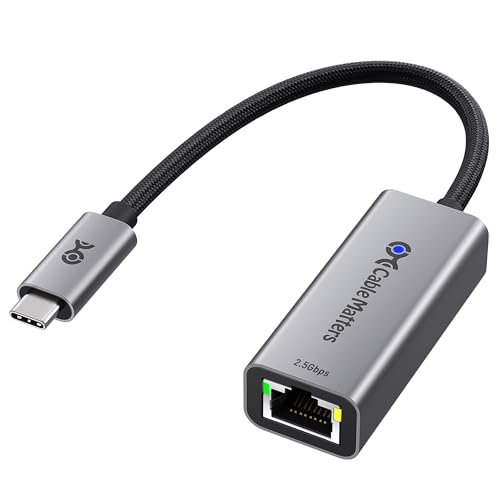
Cable Matters USB C to 2.5Gb Ethernet Adapter

BrosTrend 2.5Gb USB C to Ethernet Adapter
More Details On Our Top Picks
This Acer dongle keeps things plain: one RJ45 port, USB-C on the other end, and a 1Gbps path for steady wired access. The aluminum shell should suit a bag or desk setup well, and that clean metal body sits nicely beside the MacBook Pro, iPad Pro, or thin Dell laptop crowd.
Compared with the faster picks that follow, it’s the calmer choice for everyday networking rather than heavy transfers. You may find it especially handy in a shared office or at home, where you just want a reliable cable link without extra ports or bulk.
Strong Points
- 1Gbps support covers common web work, calls, and file sync without fuss.
- Aluminum housing feels more solid than basic plastic shells.
- Plug-and-play setup keeps setup simple for mixed-use laptops and tablets.
- Works across many USB-C and Thunderbolt 3 or 4 devices, which helps if your gear changes over time.
Points To Note
- 1Gbps is fine for everyday use, but it won’t match the faster 2.5Gb or 5Gb options below.
- There’s no extra USB port on the adapter body, so it stays focused on networking only.
- A short dongle format can hang beside a laptop port, which is normal but worth keeping in mind for travel bags.
Feature Snapshot
Who It Suits Best
You’ll appreciate this most as a simple wired fix for laptops, tablets, and phones that already live in a USB-C setup.
A Better Fit Elsewhere
For faster file transfers or a more future-proof speed tier, the uni USB-C to Ethernet Adapter 2.5 Gbps makes more sense for a busy home office.
The uni model moves you up to 2.5Gbps, which gives you more room for large local transfers, faster backups, and a cleaner wired feel on modern network gear. The aluminum shell keeps the profile compact, so it should sit well beside a MacBook Air or a slim Windows laptop without turning into desk clutter.
Compared with the Acer 1Gbps adapter, this one makes more sense for people who actually notice the gap between standard gigabit and faster LAN equipment. The honest read is that your router, switch, and cable quality need to keep up, or part of that speed advantage stays on paper.
Highlights
- 2.5Gbps support gives you more headroom than the basic gigabit crowd.
- Metal construction should travel well and feel less flimsy than entry-level plastic.
- Good fit for fast home internet plans, NAS access, and work files stored on a local network.
- Thunderbolt 3 and 4 compatibility broadens the laptop match list.
Softer Spots
- The upgrade only pays off fully on a network built for 2.5Gbps.
- Like most compact adapters, it focuses on one job rather than adding extra ports.
- Aluminum housings can pick up scuffs over time, especially in a packed carry sleeve.
Core Details
Made For
You’ll get the most from this if you move large files often and want faster wired networking without jumping to a heavier dock.
Another Choice May Suit
The Belkin USB Type C to 2.5 Gb Ethernet Adapter is a better fit for anyone who wants a more established brand name on a mixed-device desk.
Belkin takes the same 2.5Gbps lane as the uni adapter, but the name carries a different kind of appeal for people who like a more established accessory brand. The shape is still compact enough for a laptop bag, and the compatibility list reaches across MacBook Pro, iPad Pro, Surface machines, and other USB-C hardware.
For a mixed desk with work and personal devices, that broad fit can matter more than chasing the highest speed tier. One thing worth considering is that 2.5Gbps only feels special when your network side can keep pace, so the adapter is best matched to modern routers or faster office switches.
Best Bits
- 2.5Gbps performance lands in a useful middle zone for many home offices.
- USB-IF certification signals careful connector and compatibility handling.
- Broad device support helps you move the adapter between laptops and tablets with less fuss.
- Compact format works well beside slim notebooks.
- Belkin’s name may feel reassuring for people who want a more established accessory line.
Room For Improvement
- It still depends on a 2.5Gbps-capable network to show its full speed benefit.
- No extra hub ports are built in, so it stays focused on Ethernet alone.
- Higher confidence from the name can come with a less aggressive feature list than some rivals.
Details At A Glance
Right Fit For
This suits you best if you want a compact 2.5Gb adapter from a familiar accessory name and use more than one USB-C device.
Where A Sibling Pick Shines
The UGREEN USB C to Ethernet Adapter 5Gb is the stronger match for you if the network on your desk already supports higher-than-2.5Gb speeds.
This UGREEN model moves into 5Gb territory, so it’s aimed at users who want a faster wired bridge between a modern laptop and a capable network. The aluminum body with thermal design points to heat handling as part of the package, which matters more once data starts moving hard and fast.
Compared with the 2.5Gb picks above, this one makes sense for more demanding local transfers or a desktop setup that already has the rest of the chain in place. For most casual office routines, that extra speed may be more than you need, but the headroom is real.
Upsides
- 5Gb support offers a meaningful speed jump over the 2.5Gb models.
- Thermal-focused aluminum build should suit longer wired sessions at a desk.
- Thunderbolt 5, 4, and 3 compatibility broadens its reach across newer systems.
- Good match for large file movement, local media work, and network-attached storage use.
Minor Gripes
- The 5Gb tier only earns its keep on hardware built to use it.
- It may be more adapter than some everyday users need for email and browsing.
- Higher performance usually means a little more attention to cable and port quality.
Technical Sheet
Whose Shelf It Belongs On
You’ll get the most from this if your desk already runs faster networking gear and you want more than a basic internet bridge.
Skip It When
The Cable Matters USB C to 2.5Gb Ethernet Adapter is the safer fit for everyday office use where 5Gb headroom would sit idle.
Among these Ethernet to Thunderbolt adapters, this is the speed-focused option for people who want 5Gb performance and use modern USB4 or Thunderbolt 5 or 4 hardware. That makes it especially appealing for large transfers, local backup jobs, and desktop setups where the network side is already strong.
Compared with the UGREEN 5Gb adapter, this Cable Matters model leans more into the same high-speed niche with a cleaner single-purpose profile. The trade-off is simple, it won’t replace a dock, so you still need separate gear for extra USB ports or display needs.
What We Like
- 5Gb Ethernet gives you the highest wired throughput in this roundup.
- USB4 and Thunderbolt 5 or 4 support suits newer laptop hardware well.
- Good fit for people moving large files to local storage or network drives.
- Single-purpose design keeps the footprint focused and uncomplicated.
Areas To Watch
- It makes the most sense only on a network that can use 5Gb speed.
- No extra hub ports mean you’ll need separate accessories for peripherals.
- Faster adapters tend to reward better cables and solid port alignment.
Core Details
The Right Fit
This belongs on a desk where wired speed matters more than extra ports, especially for high-capacity file handling.
Look Elsewhere When
The Acer USB C to Ethernet Adapter 1Gbps Aluminum is the easier pick for lighter laptop use and a smaller network budget.
This Acer stands apart because it bundles Ethernet with three USB 3.0 ports, so it does more than just get you online. On a cramped desk, that can reduce the number of little hubs and cables you keep juggling, and the short 0.65-foot length suggests a close-in setup rather than a loose travel tether.
Compared with the plain Acer 1Gbps adapter, this one is the more useful pick for people who still plug in drives, keyboards, or card readers. The trade-off is that a multiport body can feel busier than a simple dongle, so it suits desktop use more than pocket carry.
Reasons To Buy
- Ethernet plus three USB 3.0 ports helps cut down on extra accessories.
- 1Gbps network speed covers daily browsing, calls, and file access.
- Short cable length keeps the layout neat beside a laptop or tablet.
- Aluminum construction supports a sturdier feel and practical heat handling.
Small Caveats
- The hub format is less pocket-friendly than a tiny single-port adapter.
- 1Gbps remains a basic speed tier beside the 2.5Gb and 5Gb picks.
- A multiport device usually means a little more cable management on the desk.
Feature Card
Built With In Mind
You’ll like this most if your laptop setup still needs USB ports for drives, keyboards, or card readers alongside Ethernet.
Another Choice May Suit
The Cable Matters USB C to 2.5Gb Ethernet Adapter is the better match for a travel-first setup that only needs networking and nothing else.
This is the smaller-speed-step sibling to the Cable Matters 5Gb model, and that matters for people who want a quicker-than-basic wired link without chasing the highest tier. It suits laptop bags well because the design stays focused on one job, which is often exactly what you want for hotel desks, campus setups, or a shared work table.
Compared with the broader Acer USB to Ethernet Adapter USB-C Hub 1Gbps, it keeps the footprint tighter and the purpose narrower. The trade-off is obvious, you get speed and portability, not extra ports, so it’s a cleaner fit for people who already carry a separate hub.
Plus Points
- 2.5Gbps gives you a useful speed bump over standard gigabit adapters.
- Small body makes it easy to keep in a tech pouch or laptop sleeve.
- USB4 and Thunderbolt 4 or 5 support extends compatibility across newer machines.
- Single-purpose layout keeps desk setup straightforward.
Worth Noting
- It only shows its advantage on a network built above 1Gbps.
- No extra ports means it won’t replace a travel hub.
- Tiny accessories are easy to misplace, so storage habits matter here.
Quick Facts
Who Should Grab It
This works well for you if you want a pocketable 2.5Gb adapter for a laptop-first routine.
Where A Sibling Pick Shines
The BrosTrend 2.5Gb USB C to Ethernet Adapter is a better fit for households that want one network adapter to move between more device types.
BrosTrend aims at the practical middle ground, with 2.5Gbps wired networking and plug-and-play setup for a range of USB-C devices. The broader device list, including MacBook, iPad, iPhone, Windows, iOS, and macOS mentions, makes it feel like the family-sharing option in this group.
Compared with the more brand-forward Belkin adapter, this one leans into versatility rather than name recognition. The lifetime protection wording on the listing may appeal to long-term planners, though the real day-to-day value still comes from whether your network gear can actually use the faster speed.
Bright Spots
- 2.5Gbps covers a strong middle lane for modern home and office networking.
- Plug-and-play setup keeps it simple for mixed household use.
- Broad OS and device support makes it easier to share between machines.
- Good choice for people who want a single adapter that can move around the house.
Honest Caveats
- Faster wired performance still depends on the rest of the network chain.
- The broad compatibility list does not replace the need to check your exact port type.
- Shared-use gear can disappear into a bag or drawer, so a fixed storage spot helps.
Feature Rundown
The Right Fit
This is a sensible match for a household that wants one adaptable 2.5Gb Ethernet solution for several USB-C devices.
Reach For A Different Pick When
The Acer USB C to Ethernet Adapter 1Gbps Aluminum makes more sense for a simple work-only setup that values a lower-speed, lower-friction path.
How To Choose The Right Ethernet To Thunderbolt Adapters
Speed Tier Matters More Than The Label
Gigabit adapters handle normal web work, video calls, and cloud sync with ease. A 2.5Gbps adapter starts to matter once your internet gear, switch, or local storage can move faster than standard gigabit. 5Gbps models sit higher still, and that extra room pays off most during large file transfers or local backup jobs.
Choose the speed that matches your network, not just the biggest number on the listing. A fast adapter on a slow router feels like a sports car in traffic, nice to own, but not fully used.
Compatibility Is About The Whole Chain
USB-C and Thunderbolt support are closely related, but they are not identical in how devices are set up. Most of the picks here work with Thunderbolt 3, 4, or 5 capable systems, yet your laptop port, operating system, and cabling still need to line up.
That matters most for MacBook users, mixed-device desks, and anyone moving the adapter between a laptop and a tablet. A broad compatibility list is helpful, but your exact machine still deserves a quick check before you settle on a model.
Build Quality Changes Daily Use
Aluminum shells usually feel better in a bag and often handle desk wear more gracefully than lightweight plastic. Thermal design can matter on faster models, because higher data movement can mean more heat around the connector body.
For travel, compact housings beat bulky hub-style layouts. For a fixed workstation, a multiport adapter can earn its space by combining Ethernet with USB ports, which is useful when your desk already feels crowded.
Match The Adapter To Your Work Pattern
Light email use, meetings, and general browsing fit the Acer 1Gbps model just fine. Local backups, media files, and large project folders point you toward 2.5Gbps or 5Gbps choices. If your setup changes often, a simpler single-port adapter usually stays easier to live with.
That’s the real decision here, not chasing the biggest spec sheet. The right Ethernet to Thunderbolt adapter is the one that fits your desk, your device, and the speed your network can actually use.
What To Weigh Before You Commit
Wrong Turns To Avoid
Many people grab the fastest number and forget the router or switch side of the equation. Others buy a compact adapter for a desk that really needs extra USB ports, then end up adding another hub anyway.
Length matters too, especially on crowded laptops or travel setups. A tiny dongle saves space, but a short cable or hub body can be easier to live with once peripherals start stacking up.
When Paying More Pays Off
Higher-tier models usually cost more because they support faster data rates, better housings, or more careful thermal handling. Some also add certification or broader device compatibility, which can reduce guesswork on mixed hardware.
The upgrade makes sense for people who move large files often, use network storage, or need a shared adapter across newer machines. For basic internet access, a simpler 1Gbps model often does the job without extra complexity.
Final Thoughts
Your best match depends on how much speed your network can actually use and whether you want a plain adapter or a hub-style helper. The Acer 1Gbps and the Acer hub are the easier everyday choices, while the 2.5Gb and 5Gb models suit faster homes and busier desks. Pick the one that fits your ports, your desk space, and the way you work, then keep the setup simple. That usually feels right for the long run.



