

Handheld engravers suit you when labels, jewelry, gifts, and craft projects need a personal mark without a full workshop setup. The right pick depends on how steady your hand feels, what surfaces you work on, and whether you want a cordless pen, a fuller rotary kit, or a desktop laser setup. Some are better for quick touch-ups on glass or metal, while others make more sense for repeated, detail-heavy jobs. The shortlist below keeps those differences clear.
Quick Look At The Shortlist

Hotrose Electric Engraving Pen with 37 Bits

Fanttik F2 PRO Cordless Rotary Tool Kit
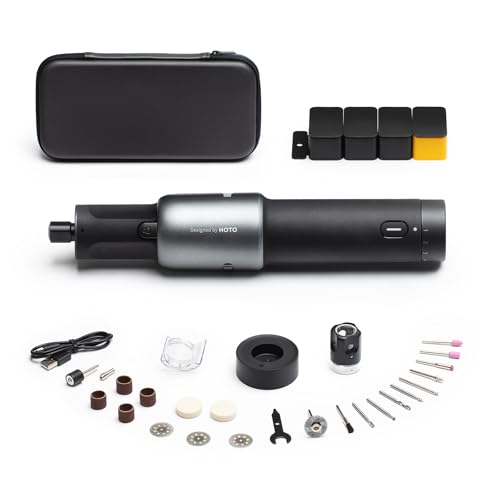
HOTO 35-in-1 Cordless Rotary Tool Kit

Uolor USB Rechargable Engraving Pen with 42 Bits

Craft Culture EtchMate Engraving Pen

Twotrees TTS-55 Pro Laser Engraver

ACMER S1 Laser Engraver

ACMER S1 Laser Engraver 2500mW
More Details On Our Top Picks
The Hotrose pen leans toward simple, portable work, which suits jewelry tags, glass accents, and small wood pieces. The solid metal shell gives it a more substantial hand feel than the light plastic bodies common in this class, and the overload protection chip adds a useful safety buffer when the bit meets resistance.
That makes it a sensible starter tool for careful hobby work, especially for you if you want a cordless pen that feels sturdier than the usual budget option. The trade-off is that a compact engraving pen still asks for a steady grip and realistic expectations on dense surfaces, so it’s better for controlled marking than heavy carving.
Strong Points
- 37 bits give you room to match the tip to different materials and line styles.
- USB charging keeps the tool easier to top up from a desk, craft cart, or small studio setup.
- The metal exterior should hold up better than softer-feeling plastic housings in everyday storage and handling.
- Overload protection helps reduce stress on the tool during tougher passes.
Minor Gripes
- Small engravers still depend on your hand control, so neat results take patience.
- The compact format is less suited to long, aggressive sessions on harder stock.
- Bit changes and cleanup are part of normal ownership, especially after dusty material work.
Feature Snapshot
Who It Suits Best
Casual crafters, jewelry hobbyists, and gift-makers who want a compact pen for light engraving will get the most out of it.
Where A Sibling Pick Shines
Craft Culture EtchMate suits you better than the Hotrose pen when you want more bits, an LED work light, and stronger speed range for broader tabletop projects.
The Fanttik F2 PRO feels aimed at mixed DIY jobs, not just engraving. With 55 accessories, a strong magnetic motor, and five speed settings, it gives you the range to move from carving to polishing or drilling without changing to a different tool family.
That broader kit makes sense in a busy garage or craft room where you want one cordless rotary tool to cover more ground. The honest read is that all those extras can be more than you need for simple name-marking, so it suits you best when your projects keep shifting.
Highlights
- 55 accessories widen the tool’s job range for sanding, carving, drilling, polishing, and cutting.
- Five speed settings let you slow down for detail work or move up for faster material removal.
- The magnetic motor design should help with consistent tool feel during longer sessions.
- Cordless use keeps your bench clearer, especially in small work areas.
Points To Note
- The accessory count is great on paper, yet it takes organization to keep the kit tidy.
- Pure engraving-only users may find the broader feature set more than they need.
- Rotary tools still need regular bit care and storage so cutting edges stay in good shape.
At A Glance
Whose Shelf It Belongs On
You get the most value here when you want one cordless rotary tool for a range of home projects, not just engraving alone.
Swap It Out When
HOTO’s 35-in-1 cordless rotary kit makes more sense than the Fanttik F2 PRO for you when you want a slightly smaller accessory set with the added benefit of an LED light.
HOTO takes a more polished route than the Fanttik kit, and that shows in the 35-in-1 setup plus LED light for tighter workspaces. A tool like this fits you well on a desk, craft bench, or basement corner where seeing the mark clearly matters as much as spinning power.
The 25,000 RPM ceiling and five speed choices give it enough range for engraving, sanding, and other detail tasks without feeling overbuilt. The trade-off is the smaller accessory spread compared with Fanttik’s larger bundle, though that can also make the kit easier to manage.
What We Like
- LED lighting helps you keep the work zone visible on darker benches.
- 35 accessories cover the core rotary tasks without turning the kit into clutter.
- Five speeds give you control for light marking and more assertive shaping.
- The cordless design keeps movement simple around craft tables and hobby stations.
Softer Spots
- The accessory set is useful, though it is less expansive than Fanttik’s 55-piece bundle.
- LED help is handy, but you still benefit from a well-lit bench.
- Accessory storage matters here, since compact kits can get messy fast in shared drawers.
Details At A Glance
Who Should Grab It
You fit this pick best when you want a compact cordless rotary kit with a cleaner accessory count and better visibility for close-up work.
A Better Fit Elsewhere
Fanttik F2 PRO suits you more than the HOTO kit when you want a larger accessory spread for switching between sanding, carving, and drilling more often.
Uolor keeps things straightforward, and the 42-bit bundle gives you a bit more room to match the job than Hotrose’s 37-piece set. USB recharging and cordless use make it easy to carry between a kitchen table, craft shelf, or small work cart without hunting for a wall outlet.
The source notes roughly 30 minutes of idle cordless use after a full charge, which is enough to matter for quick craft sessions. That time window works best for touch-ups, initials, and short engraving runs, not for long sessions that stretch into a full afternoon.
Bright Spots
- 42 bits give you more tip variety than several basic pens in this group.
- USB charging makes it simple to power from common household gear.
- Cordless use suits quick jobs around the house or studio.
- The compact format stores easily in a drawer or craft tote.
Small Caveats
- About 30 minutes of idle cordless use means this is better for shorter sessions.
- The pen format works best on careful, controlled work rather than heavy material removal.
- Bits and small accessories need a tidy storage spot so they do not scatter.
Core Details
Right Fit For
You suit this pick best when you want a small rechargeable pen for quick household crafting and occasional engraving on a mix of materials.
Consider Something Else When
Hotrose Electric Engraving Pen with 37 Bits is the cleaner fit for you if a metal shell and overload protection matter more than a slightly larger bit set.
EtchMate is the most openly all-purpose pen in this list, and that broad material support makes it easy to picture in a home workshop, jewelry bench, or gift-making station. The 31 bits, LED work light, and adjustable speed up to 20,000 RPM give you the kind of control that matters when the surface changes from wood to glass to leather.
Compared with the smaller pens above, this one feels more ready for varied craft jobs rather than occasional touch-ups. The trade-off is that broad versatility still depends on your own pace and a clean workspace, since detail work gets easier when the line of sight is clear and the bits stay organized.
Upsides
- Built for wood, glass, metal, leather, and more, so it covers many common craft surfaces.
- 31 bits give you practical variety without making the kit feel bloated.
- LED work lighting helps in dim corners and on small pieces.
- Up to 20,000 RPM lets you adjust the pace for careful marking or firmer passes.
- It feels like a solid step up when you want one pen for several project types.
Areas To Watch
- More versatility usually means a bit more setup time to match the right tip and speed.
- Small accessory kits still need sorting after use, especially in shared drawers.
- For very heavy carving, a desktop machine may suit you better.
Feature Rundown
Built With In Mind
You fit this pick best when you want a versatile engraving pen for mixed craft materials and a setup that feels ready for regular tabletop use.
A Better Fit Elsewhere
Hotrose Electric Engraving Pen with 37 Bits makes more sense for you if a tougher metal body and overload protection matter more than the broader material range here.
The Twotrees TTS-55 Pro moves into desktop territory, which changes the conversation from handheld touch-ups to repeatable laser work. A 300 x 300 mm work area gives you room for larger pieces, and the 0.08 mm laser spot points to the kind of fine detail that matters for text, outlines, and controlled pattern work.
That larger footprint makes it a natural fit for a bench or dedicated corner rather than a tote-and-go craft bag. The honest trade-off is setup space, since desktop laser equipment asks for more room, more planning, and a more fixed workflow than the pen-style tools above.
Reasons To Buy
- Large 300 x 300 mm area lets you handle bigger projects without squeezing them into a tiny frame.
- Laser spot size supports fine detail on craft and workshop pieces.
- The machine format suits repeat jobs better than a handheld pen can.
- Good fit for a home shop that wants more production-style workflow.
Worth Noting
- Desktop size means you need a permanent or semi-permanent place for it.
- It is a different category from the pen-style engravers, so casual portability is not the point.
- Cleanup and workflow planning matter more with a larger laser machine.
Quick Facts
Who Will Love This
You suit this pick best when you want a desktop laser engraver for larger craft, decor, or small workshop tasks rather than a pocketable tool.
Look Elsewhere When
ACMER S1 Laser Engraver is the better fit for you if you want a smaller 130 x 130 mm footprint with a more compact setup.
ACMER’s S1 keeps the desktop laser format compact, and that matters in a small workshop or crowded home office. The 130 x 130 mm working area is modest, yet the 0.04 mm laser spot and 10,000 mm/min engraving speed point toward careful detail work with a smaller physical footprint.
It also arrives 99% preassembled, with just a short laser head setup, which takes some of the friction out of first use. That easier start helps beginners and hobbyists, though the smaller bed means this pick makes more sense for labels, ornaments, and compact parts than broad-panel work.
Best Bits
- Compact footprint suits desks where space is tight.
- 99% preassembled setup reduces the usual first-build hassle.
- 0.04 mm laser spot supports very fine detail.
- 10,000 mm/min engraving speed helps with efficient work on smaller jobs.
- Handles engraving and cutting, so it covers more than decorative marking alone.
Room For Improvement
- 130 x 130 mm area is small, so larger pieces need a different machine.
- Desktop use still asks for a dedicated setup space.
- Small parts can make layout and cleanup feel more delicate than with pen tools.
Spec Overview
The Right Fit
You suit this pick best when you want a compact desktop engraver for detailed work on a small bench and a simpler first setup.
Where A Sibling Pick Shines
Twotrees TTS-55 Pro Laser Engraver suits you better if your projects need a much larger 300 x 300 mm workspace.
This version of the ACMER S1 leans into the same compact desktop idea as the earlier S1, but it is framed more broadly for DIY work, small business use, and makers. The 130 x 130 mm work area keeps it manageable, and the 2500mW laser power puts it in a sensible range for a small production corner or home craft station.
It also ships with Acmerstudio software support, plus compatibility with other popular engraving software, which helps you choose a workflow that feels familiar. That flexibility matters more than it sounds, especially when you want to move from hobby projects to repeatable jobs without learning a new system every time.
Plus Points
- Compact desktop size suits cramped workspaces and smaller benches.
- Software support gives you a clear path into setup and day-to-day use.
- Compatibility with other engraving software keeps the workflow flexible.
- It fits both craft work and small-batch project routines.
Things To Consider
- The 130 x 130 mm area is still a compact frame, so large projects need a bigger machine.
- Desktop equipment works best with a dedicated spot and planned cable management.
- For simple pen-style marking, a handheld option may be easier to live with.
Core Details
Who Should Grab It
You fit this pick best when you want a compact desktop laser engraver that can support hobby work and small-batch maker tasks with flexible software choices.
A Better Fit Elsewhere
ACMER S1 Laser Engraver is the better fit for you if the same compact frame matters more than the broader maker-friendly framing here.
How To Choose The Right Handheld Engravers
Match The Tool To The Surface
Metal, glass, wood, plastic, and leather all ask for different touch levels. A compact pen with multiple bits works well for jewelry tags and ornaments, while a rotary kit gives you more range on mixed craft tasks.
Laser machines change the equation again, since they suit repeatable desktop work rather than hand-guided tracing. You save time and frustration by choosing the category that fits your materials first, then the accessory count second.
Think About Control Before Power
RPM, or revolutions per minute, tells you how fast the bit spins. Higher speed helps with some carving and polishing jobs, but control matters more for fine lettering, shallow marks, and tidy lines.
Variable speed is useful because it lets you slow down on fragile surfaces and speed up on thicker stock. For small workshops and craft tables, that adjustment often matters more than headline power alone.
Portability Changes How You Use It
Cordless pens suit quick projects, shared rooms, and grab-and-go storage. USB charging helps when you keep the tool in a drawer or move it between the kitchen table and a workbench.
Desktop laser machines ask for more space, more planning, and a steadier setup. That trade-off makes sense for makers who engrave often, while occasional hobby use usually feels easier with a lighter handheld tool.
Kit Size Shapes The Learning Curve
A large accessory set sounds appealing, yet it only helps when the extras are easy to organize and actually match your work. Fewer bits can be enough for beginners who want less clutter and faster setup.
More experienced hobbyists often appreciate larger bundles because they can move from engraving to sanding, drilling, or polishing without changing tools. The cleanest choice is the one that fits your pace, not the longest feature list.
Things Worth Knowing First
Common Shopping Slip Ups
Many shoppers focus on bit count and ignore the kind of material they plan to mark. A large bundle does not help much if the tool body feels flimsy or the speed range is poorly matched to your surface.
Another common miss is underestimating storage. Small bits, cords, and adapters can disappear fast in a craft drawer, so the neatest setup is often the one that stays organized from day one.
When Paying More Pays Off
Higher-tier tools usually cost more because of steadier motors, better lighting, broader speed control, or larger work areas. You also pay for better accessory ranges and, in desktop machines, more capable software support.
That extra spend makes sense when you engrave often, switch materials a lot, or want a machine that feels less fussy during repeated use. For occasional labels and small gift projects, a simpler pen is often enough.
Closing Remarks
The best handheld engraver for you depends on how you work, not on the longest feature sheet. A metal-bodied pen is a smart place to start for quick craft tasks, while a fuller rotary kit gives you more room to grow. For more serious desktop work, the laser options bring bigger work areas and a steadier workflow. Choose the tool that matches your space, your materials, and how often you plan to use it.



